Overview
Walmart usually requires a unique product code (UPC, EAN, or GTIN) for each product you list. If you don't have UPCs, you can either buy them and upload them to PODtomatic or request an exemption from Walmart.
The Short Answer: Which Categories to Pick
This is where almost everyone gets stuck. Walmart's exemption form doesn't ask you for a broad category like "mugs" — it makes you drill down and tick exact product types inside three top-level categories. Here is the full list for PODtomatic products:
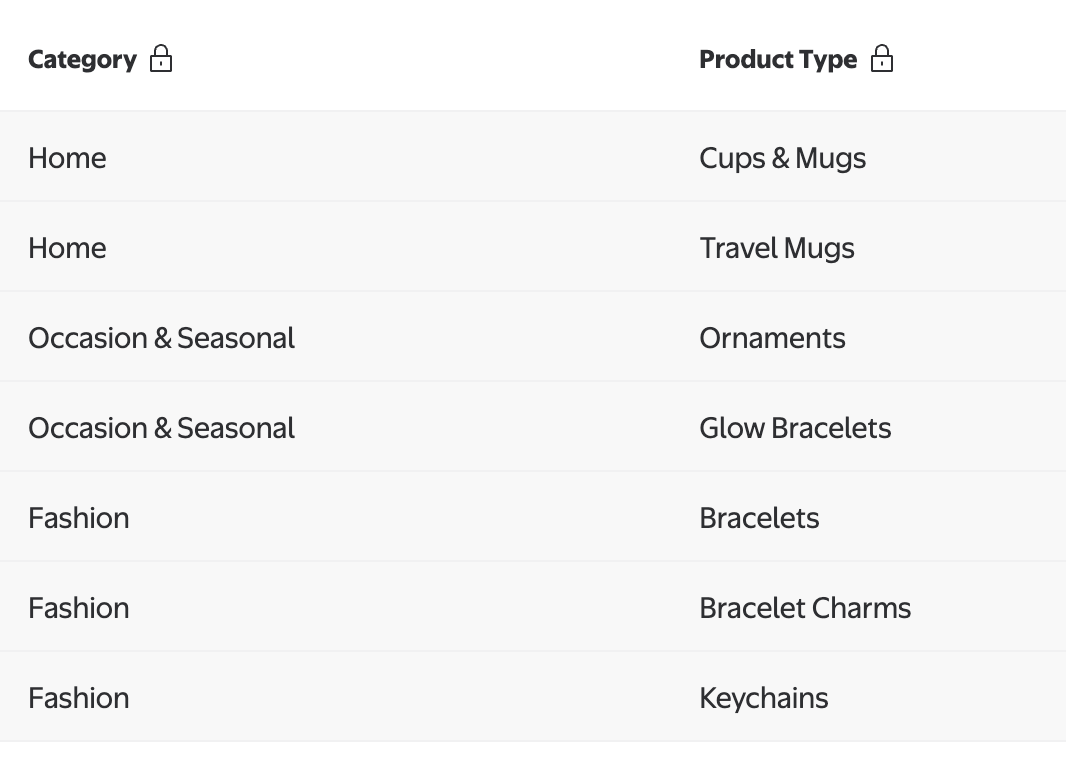
| Category | Product Type (tick this) | Found under | Search for |
|---|---|---|---|
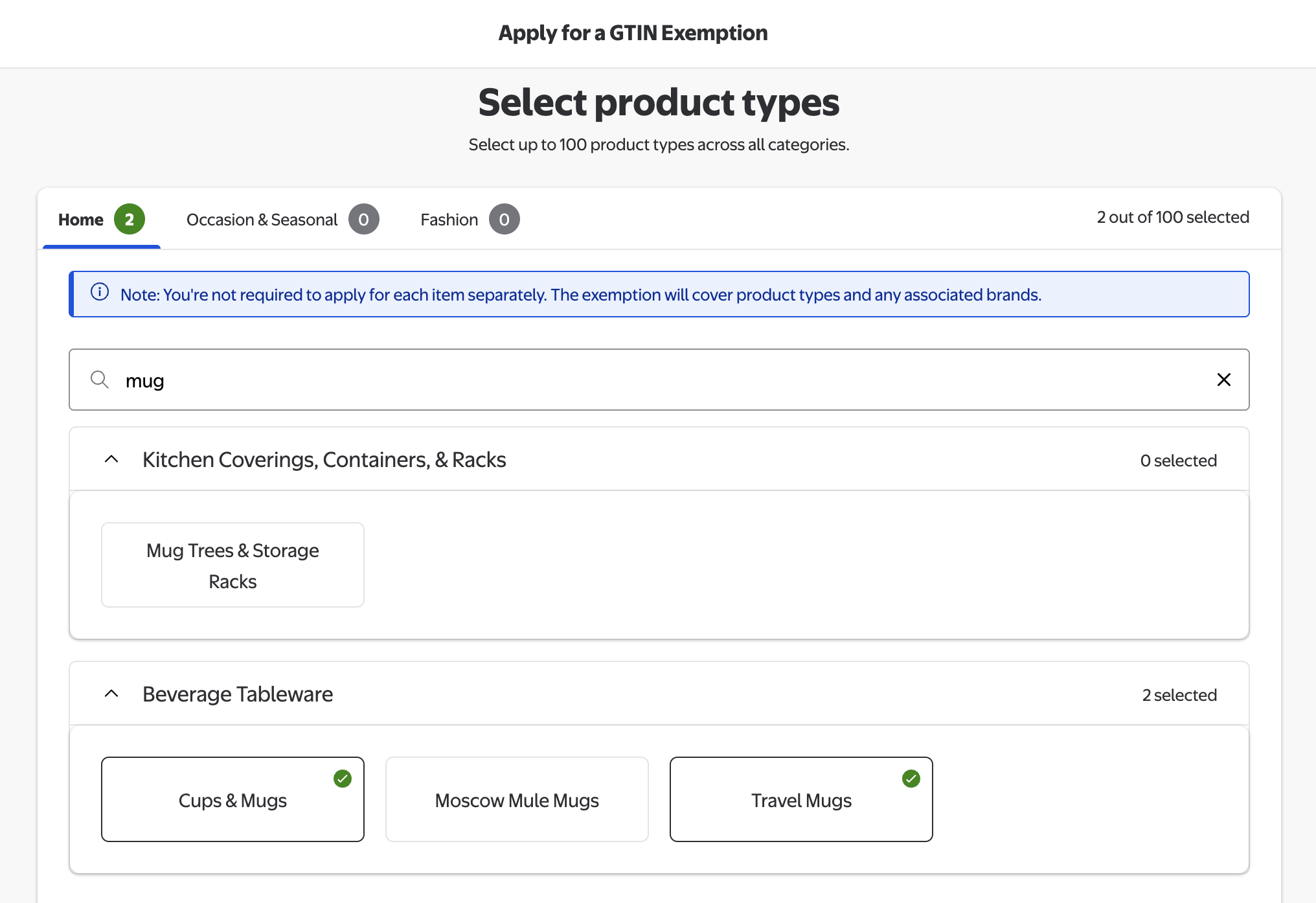
| Home | Cups & Mugs | Beverage Tableware | mug |
| Home | Travel Mugs | Beverage Tableware | mug |
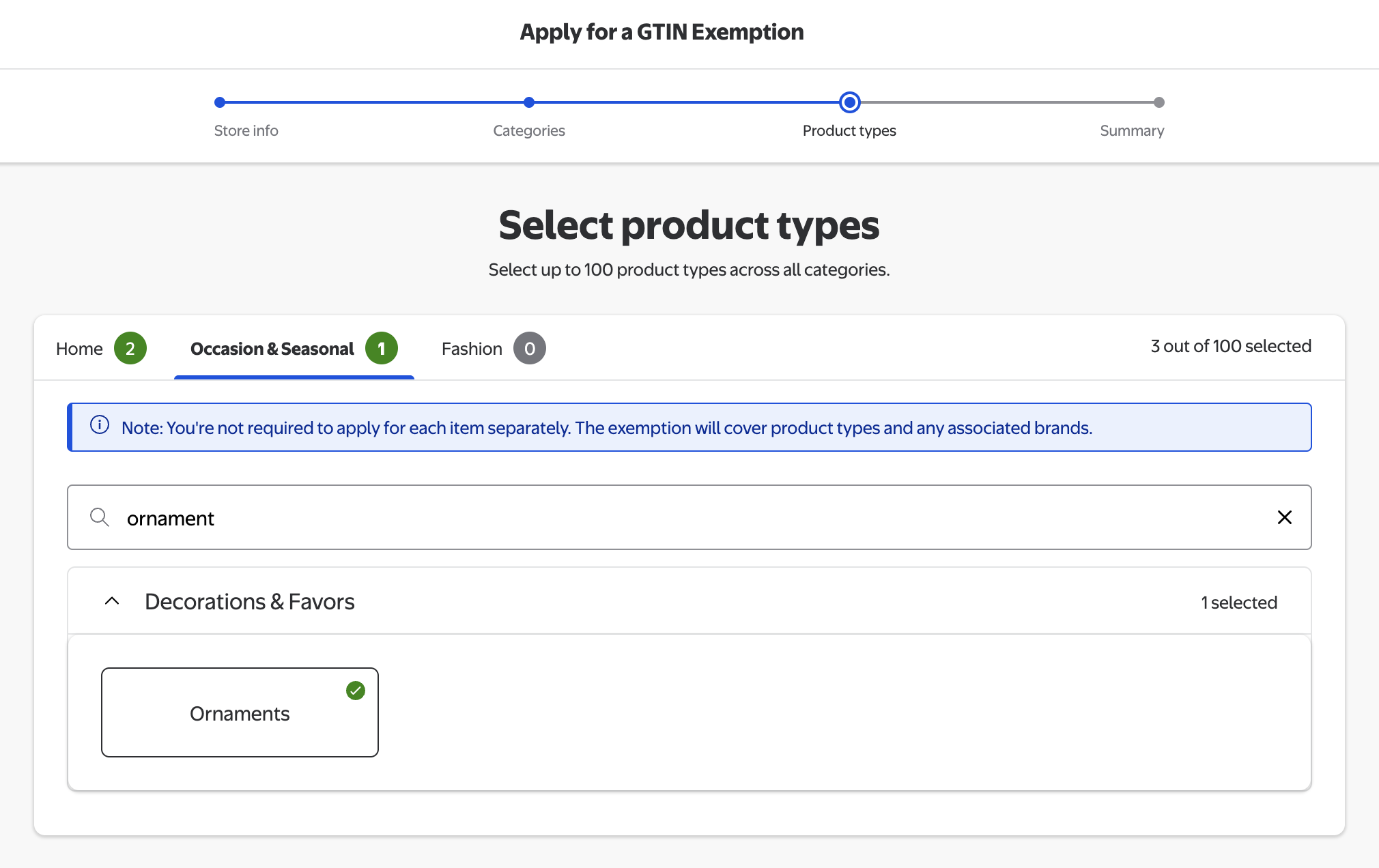
| Occasion & Seasonal | Ornaments | Decorations & Favors | ornament |
| Occasion & Seasonal | Glow Bracelets | Decorations & Favors | glow |
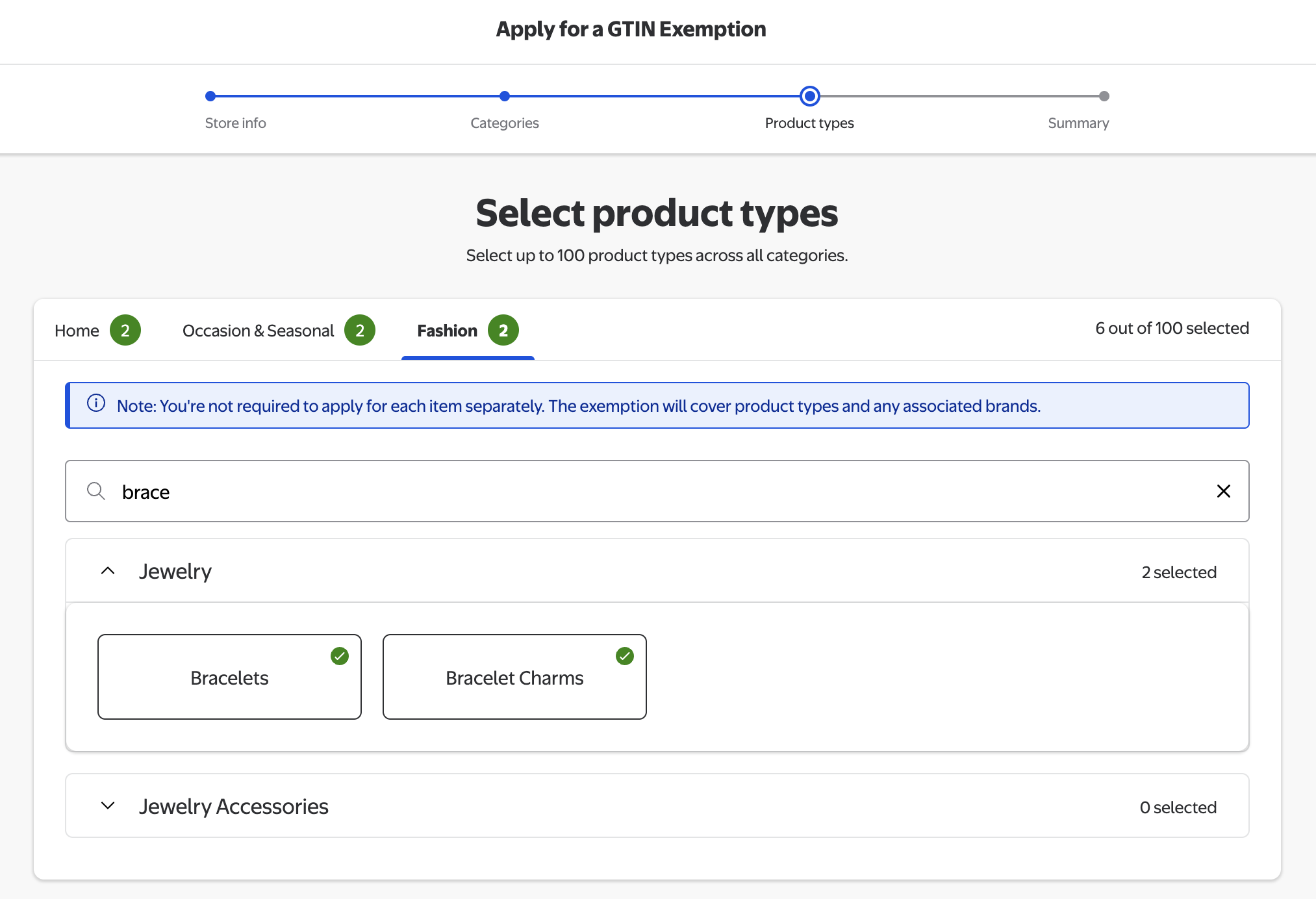
| Fashion | Bracelets | Jewelry | brace |
| Fashion | Bracelet Charms | Jewelry | brace |
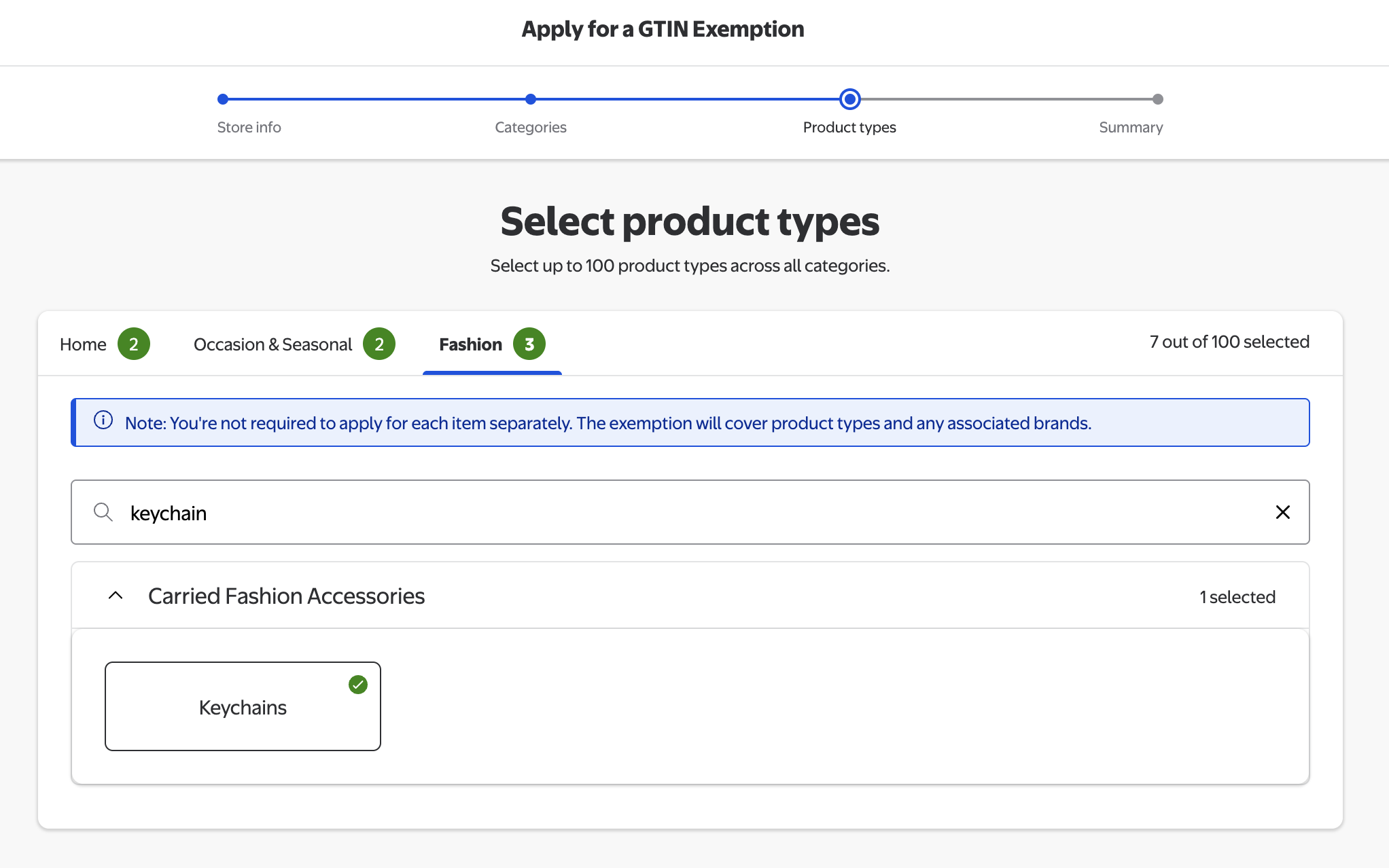
| Fashion | Keychains | Carried Fashion Accessories | keychain |
That's 7 product types across 3 categories. Walmart lets you select up to 100 product types in a single application, so you can — and should — request all seven at once instead of filing separate applications.
Good news: Walmart's form states it directly — "You're not required to apply for each item separately. The exemption will cover product types and any associated brands." One approved application covers every mug, ornament, bracelet and keychain you upload, under any brand name.
How to Apply for a UPC/GTIN Exemption (Step by Step)
Walmart now uses a self-serve wizard with four steps: Store info → Categories → Product types → Summary. You no longer need to open a support ticket first.
Step 1: Open the exemption application
Log in to Walmart Seller Center, click the ? (Help) icon at the top right, choose Contact Support, and search for "Request UPC/GTIN Exemptions". Walmart will hand you off to the "Apply for a GTIN Exemption" wizard. (If your account already shows the wizard under Settings, you can go straight there.)
Step 2: Fill in Store info
Confirm your store name and business details. This is prefilled from your seller account in most cases — just verify it's correct and continue.
Step 3: Select your categories
On the Categories step, tick the three categories PODtomatic uploads to: Home, Occasion & Seasonal, and Fashion. Only the categories you tick here will appear as tabs on the next step, so don't skip any.
Step 4: Select product types — Home
On the Home tab, type mug into the search box. Under Beverage Tableware, select Cups & Mugs and Travel Mugs. Ignore "Mug Trees & Storage Racks" and "Moscow Mule Mugs" — those aren't PODtomatic products.
Step 5: Select product types — Occasion & Seasonal
Switch to the Occasion & Seasonal tab and search ornament. Select Ornaments under Decorations & Favors. Then clear the search, type glow, and also select Glow Bracelets.
Step 6: Select product types — Fashion
Switch to the Fashion tab and search brace. Under Jewelry, select Bracelets and Bracelet Charms.
Still on the Fashion tab, clear the search and type keychain. Select Keychains under Carried Fashion Accessories. Your counter should now read 7 out of 100 selected.
Step 7: Check the Summary and submit
The Summary step lists every category and product type you selected. Compare it against the screenshot below — if all seven rows match, submit the application.
Tip: If Walmart asks why you need the exemption, say you sell print-on-demand, made-to-order products that are produced per order and therefore have no manufacturer-assigned barcode.
Why These Specific Product Types
Each one maps directly to what PODtomatic uploads to your Walmart store:
🏠 Home
- Cups & Mugs - Standard 11oz/15oz coffee mugs, two-tone and colour-changing mugs
- Travel Mugs - Tumblers, camping mugs and insulated travel drinkware
🎄 Occasion & Seasonal
- Ornaments - Ceramic, acrylic and metal holiday ornaments
- Glow Bracelets - Where Walmart's taxonomy files certain party/seasonal wristbands
👗 Fashion
- Bracelets - Engraved and printed bracelets and bangles
- Bracelet Charms - Charms sold alongside bracelet products
- Keychains - Printed and engraved keychains
Note: Older guides (including an earlier version of this page) told sellers to ask for a "Household, Industrial Cleaning & Storage" exemption for candles. That's not part of the current PODtomatic catalog mapping — stick to the seven product types above. If you later add a product outside these types, run the wizard again for the new type.
What If Walmart Doesn't Approve?
Walmart does not guarantee exemptions. If they don't approve your request, you have these options:
Option 1: Purchase UPC Codes
- Buy legitimate UPC codes - Purchase from GS1 or authorized resellers
- Upload to PODtomatic - Add your UPC codes to your PODtomatic account
- Automatic assignment - PODtomatic will automatically assign UPCs to new products
Option 2: Reapply Later
- Reapply per product type - Approvals are per product type, so a rejection on one type doesn't block the others
- Wait and reapply - Sometimes exemption policies change
- Build selling history - Establish a track record on other platforms first
- Escalate through support - If the wizard rejects you, open a ticket and explain the print-on-demand model in writing
Tips for Successful Exemption Requests
Increase your chances of approval with these strategies:
📝 Be Professional and Clear
- Explain your business model - Mention you're selling print-on-demand products
- Select every product type in one go - Submitting all seven together avoids repeat reviews
- Show business legitimacy - Mention your business registration if applicable
📊 Provide Context
- Mention other platforms - If you're successfully selling on Amazon, mention it
- Explain product uniqueness - Custom, made-to-order products often don't have standard UPCs
- Show commitment - Express your intention to be a serious, long-term seller
Timeline and Expectations
Here's what to expect during the exemption process:
- Initial Response - Walmart typically responds within 24-48 hours
- Review Process - The actual review can take 3-7 business days
- Follow-up Questions - Be prepared to provide additional information if requested
- Final Decision - You'll receive an email with Walmart's decision
Important: Even if approved, exemptions are typically granted on a category-by-category basis, not as a blanket exemption for all products.
Alternative: Using UPC Codes with PODtomatic
If exemptions aren't approved, PODtomatic makes UPC management easy:
🔧 UPC Integration Features
- Bulk Upload - Upload hundreds of UPC codes at once
- Automatic Assignment - PODtomatic automatically assigns UPCs to new products
- UPC Tracking - Monitor which UPCs are used and which are available
- Multi-Platform Support - Same UPCs work across Amazon, Walmart, and Shopify
💰 Where to Buy UPC Codes
- GS1 (Official Source) - Most expensive but guaranteed legitimate
- Authorized Resellers - More affordable options with proper licensing
- Bulk Discounts - Better pricing when buying 100+ codes
Need More Help?
If you're having trouble with your Walmart UPC/GTIN exemption request:
- Contact Walmart Support - Their support team can provide the most current exemption policies
- Try Different Contact Methods - If chat doesn't work, try phone or email
- Be Persistent - Different support agents may give different answers
- PODtomatic Support - Contact our team for help with UPC code integration
Remember, getting UPC/GTIN exemptions can significantly streamline your Walmart selling process, but having backup UPC codes ensures you can start selling immediately if exemptions aren't approved.